Android
阅读 —
一次某梆加固的反root和反frida绕过with GPT5.6sol
记录一次 Android 加固应用的 Root 检测与 Frida 检测分析、定位和绕过过程。
分析过程
老板扔了一个apk过来,让我绕过反调试。老规矩还是先在真机上跑一遍,发现直接闪退,大概率是设备root的问题,用magisk hide一下就正常运行了。
然后就是看反调试在哪了,解压之后又是经典的libDexHelper.so,网上有很多绕过的教程,思路各不相同,我主要参考了xiaoeryu大佬的博客。正当我准备热火朝天开干的时候,突然发现我frida用不了了,而且平板还反复死机,突然想起来一个问题:
https://stackoverflow.com/questions/56316329/frida-failed-to-spawn-unable-to-access-zygote64-while-preparing-for-app-launc?utm_source=chatgpt.com
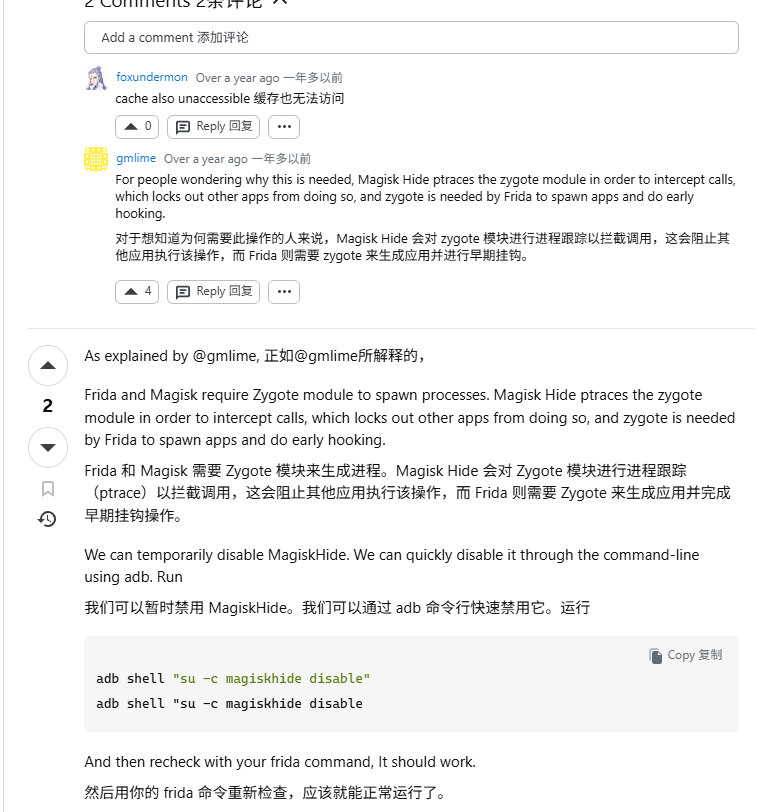
那就很尴尬了,想要用frida hook得先让他跑起来,让他跑起来得hide,hide了又hook不了了,网上的博客中都没提到过这个问题(哭),在Frida issue #2782,有看到升级frida成功避免这个问题的方法,但我懒得升级(),干脆顺便把反root也绕过好了。
用ida打开libDexHelper.so,发现加壳了
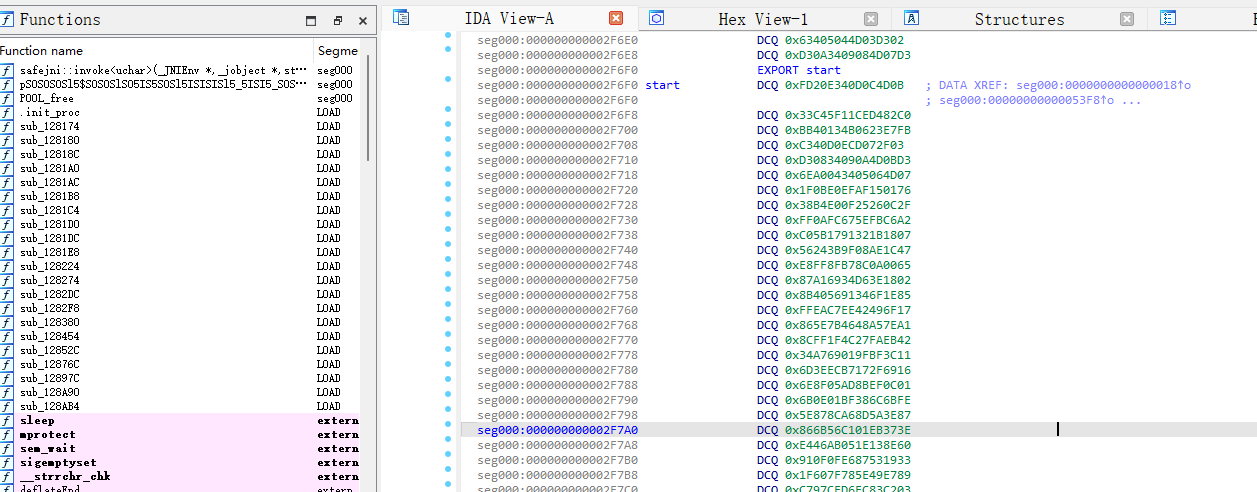
先把magisk hide关掉,然后用frida把so dump下来,再用sofixer修复
1
2
3
4
5
6
7
8
9
10
11
12
13
14
15
16
17
18
19
20
21
22
23
24
25
26
27
28
29
30
31
32
33
34
35
36
37
38
39
40
41
| function my_hook_dlopen(soName) {
Interceptor.attach(Module.findExportByName(null, "android_dlopen_ext"),
{
onEnter: function (args) {
var pathptr = args[0];
if (pathptr !== undefined && pathptr != null) {
var path = ptr(pathptr).readCString();
if (path.indexOf(soName) >= 0) {
this.is_can_hook = true;
}
}
},
onLeave: function (retval) {
if (this.is_can_hook) {
dump_so(soName);
}
}
}
);
}
function dump_so(so_name) {
var libso = Process.getModuleByName(so_name);
console.log("[name]:", libso.name);
console.log("[base]:", libso.base);
console.log("[size]:", ptr(libso.size));
console.log("[path]:", libso.path);
var file_path = "/data/data/com.****/" + libso.name + "_" + libso.base + "_" + ptr(libso.size) + "android_dlopen_ext.so";
var file_handle = new File(file_path, "wb");
if (file_handle && file_handle != null) {
Memory.protect(ptr(libso.base), libso.size, 'rwx');
var libso_buffer = ptr(libso.base).readByteArray(libso.size);
file_handle.write(libso_buffer);
file_handle.flush();
file_handle.close();
console.log("[dump]:", file_path);
}
}
setImmediate(my_hook_dlopen("libDexHelper.so"));
|
然后sofixer修复so
1
| .\SoFixer-Windows-64.exe -s libDexHelper.so_0x77e84cc000_0x129000android_dlopen_ext.so -o out1.so
|
这样就得到一个正常的so了
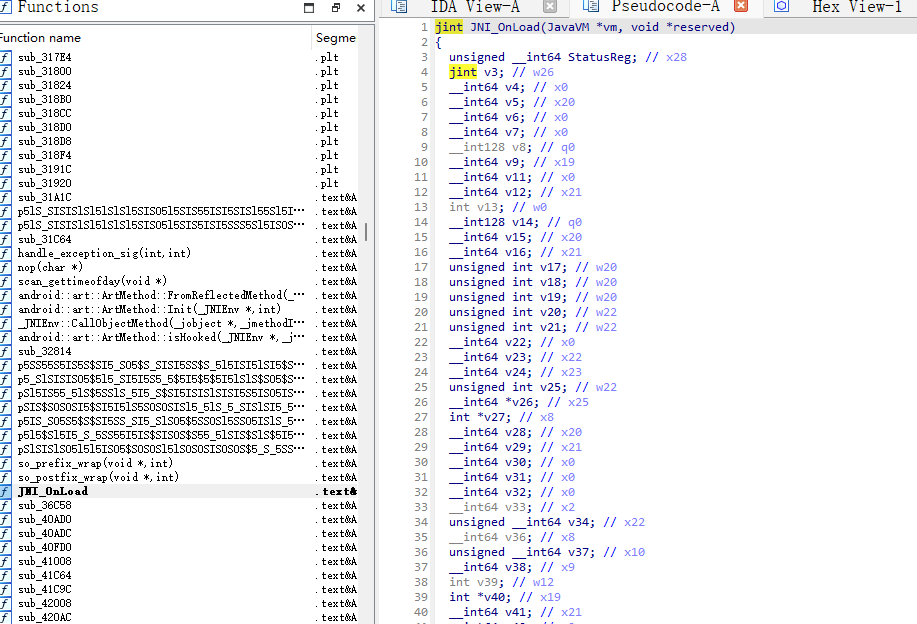
先确认一下是libDexHelper的反调
1
2
3
4
5
6
7
8
9
10
11
12
13
14
15
16
17
18
| function hook_dlopen() {
Interceptor.attach(Module.findExportByName(null, "android_dlopen_ext"),
{
onEnter: function (args) {
this.fileName = args[0].readCString()
console.log(`dlopen onEnter: ${this.fileName}`)
}, onLeave: function(retval){
console.log(`dlopen onLeave fileName: ${this.fileName}`)
if(this.fileName != null && this.fileName.indexOf("libDexHelper.so") >= 0){
let JNI_OnLoad = Module.getExportByName(this.fileName, 'JNI_OnLoad')
console.log(`dlopen onLeave JNI_OnLoad: ${JNI_OnLoad}`)
}
}
}
);
}
setImmediate(hook_dlopen)
|

接下来就是hook pthread_create看起了什么反调试线程
1
2
3
4
5
6
7
8
9
10
11
12
13
14
| function hook_pthread_create(){
var pthC_addr = Module.findExportByName("libc.so", "pthread_create");
console.log("pthC_addr >> ", pthC_addr);
Interceptor.attach(pthC_addr, {
onEnter:function(args){
console.log(args[2], Process.findModuleByAddress(args[2]).name);
}, onLeave:function(retval){
}
});
}
hook_pthread_create();
|

可以看到这里没有hook到libDexHelper起的线程,网上的博客说的是某梆也hook了pthread_create,所以需要hook更底层的clone函数,但是我试了之后发现仍然不能看到libDexHelper.so起的线程,不知道是不是版本不同的问题。
既然如此,我们就换个思路,我们hook dlopen的时候得知他已经onleave了,说明大概率是在JNI_Onload里进行的反调(JNI_Onload执行于dlopen onleave后,详细可以看看雪的相关分析),那我们就去看他JNI_Onload里是怎么反调的,这里我直接让codex去找了,很快就找出来反root在sub_532B8,反frida在sub_548DC
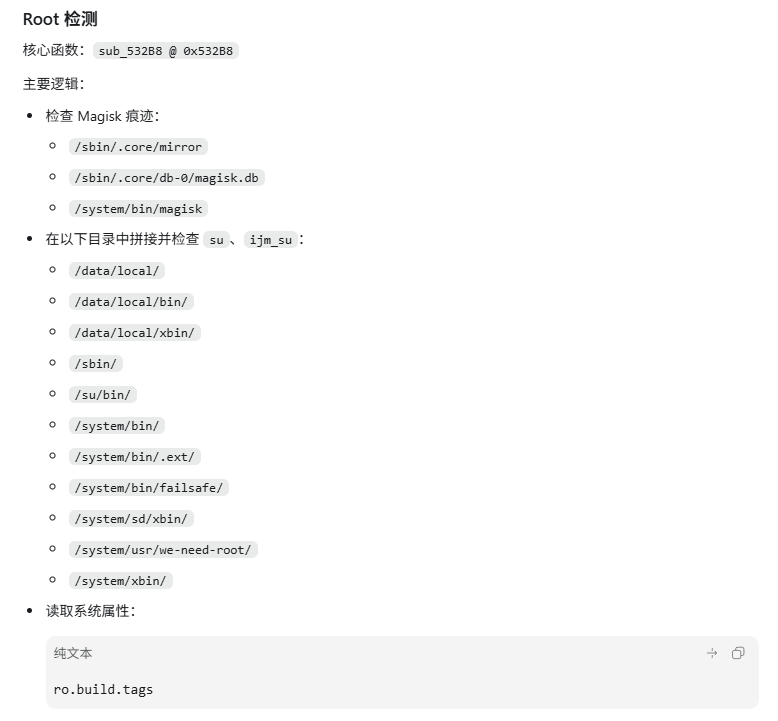
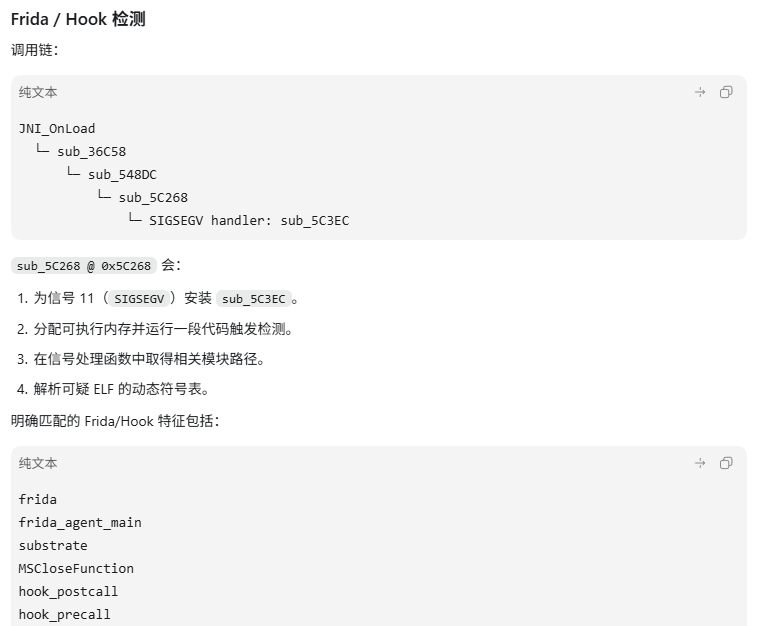
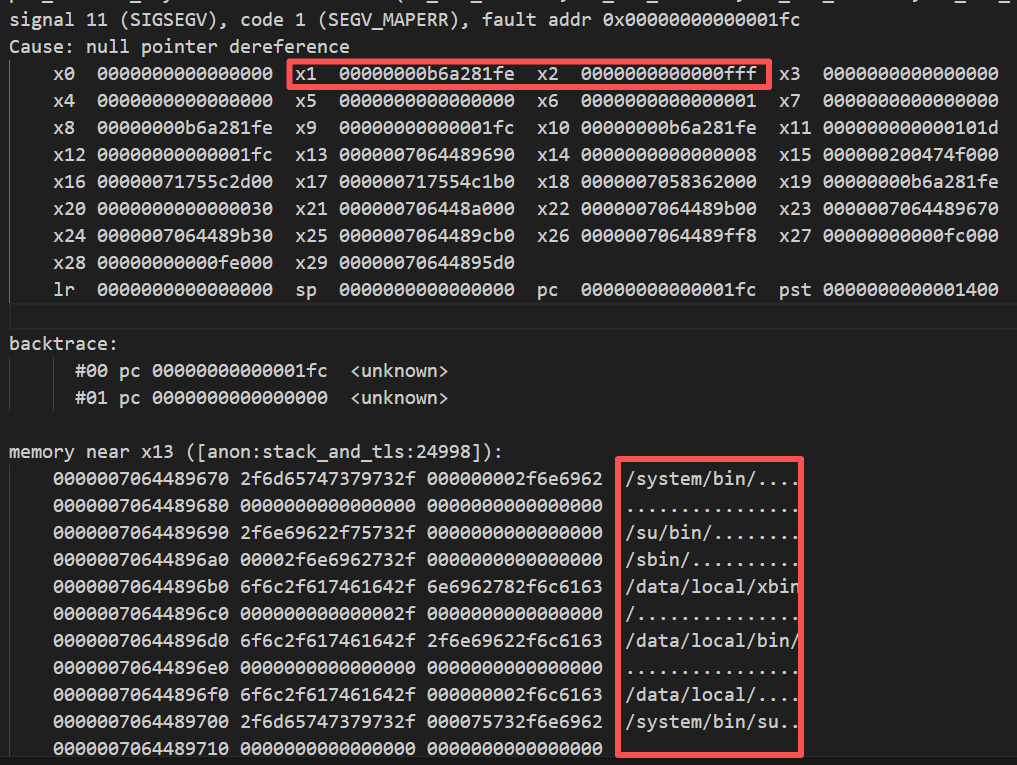
其实也就是简单搜一下字符串回溯一下,安卓的崩溃日志位于/data/tombstone中。查看日志发现,pc被指向到0x1fc导致段错误。而内存中存在/su/bin等检查root的字符串,他们恰好也在sub_532b8中出现了,说明GPT定位的root检测函数是正确的。
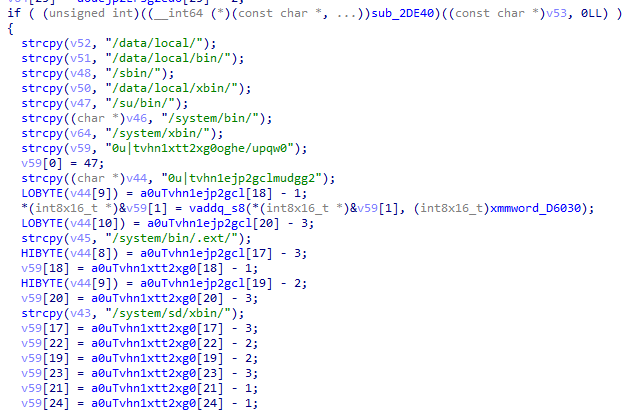
那这样大概率所有的检测都复用的一套退出函数,我们深入分析一下,其中sub_548DC调用了sub_31C64
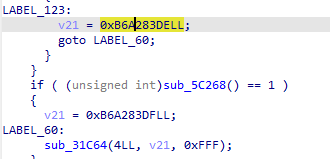
sub_532b8也同样调用了
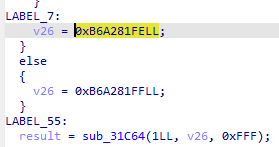
注意到sub_532b8调用sub_31c64的第二个参数刚好就是崩溃日志中x1的值,第三个参数刚好是x2的值,说明我们找的函数是正确的,这是一个统一处理检测结果的函数,我们只要把这个函数直接ret掉即可
1
2
3
4
5
6
7
8
9
10
11
12
13
14
15
16
17
18
19
20
21
22
23
24
25
26
27
28
29
30
31
32
33
34
35
36
37
38
39
40
41
42
43
44
45
46
47
48
| "use strict";
const SO = "libDexHelper.so";
let installed = false;
function describe(p) {
const m = Process.findModuleByAddress(p);
return m === null ? p.toString() : m.name + "+0x" + p.sub(m.base).toString(16);
}
function bt(ctx) {
return Thread.backtrace(ctx, Backtracer.ACCURATE)
.slice(0, 20).map(describe).join("\n ");
}
function ret0(addr) {
Memory.patchCode(addr, 8, code => code.writeByteArray([
0x00, 0x00, 0x80, 0x52,
0xc0, 0x03, 0x5f, 0xd6
]));
}
function install() {
if (installed) return;
const m = Process.findModuleByName(SO);
if (m === null) return;
installed = true;
const dispatcher = m.base.add(0x31c64);
ret0(dispatcher);
}
function hookLoader(name) {
const p = Module.findExportByName(null, name);
if (p === null) return;
Interceptor.attach(p, {
onEnter(args) {
this.hit = false;
try { this.hit = args[0].readCString().indexOf(SO) !== -1; } catch (_) {}
},
onLeave() { if (this.hit) install(); }
});
}
hookLoader("android_dlopen_ext");
hookLoader("dlopen");
console.log("[ready] exact thread origin tracer");
|
碎碎念
GPT很快就逆完了,但感觉我好像什么都没干,其中GPT在尝试绕过的时候卡住了几次,我也只能给一些方向性的建议,实际上自己也没有底,最后整理完写博客的时候才慢慢搞懂一些细节。ai确实极大的提高了逆向的速度,但如果仅限于使用ai而没有自己深入的进行分析总结,到时候也只会变成以前大家所不屑的“脚本小子”。



 文章数11
文章数11